
Byzygisk
Smart Home Hub: A Complete Guide to Features, Benefits, Compatibility, and Best Practices
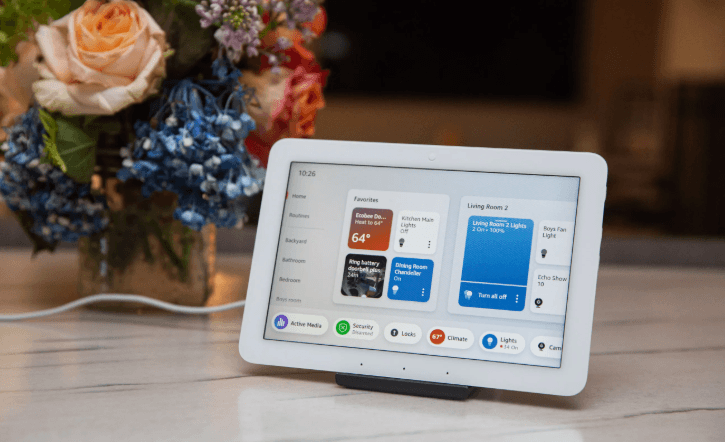
A smart home hub is a central device that connects, manages, and automates multiple smart home devices from different manufacturers. Instead of controlling each device through separate apps, a smart home hub allows users to manage compatible products such as smart lights, thermostats, door locks, security cameras, sensors, and smart plugs from a single platform.
As smart homes continue to grow in popularity, smart home hubs help simplify device management, improve automation, and enhance the overall user experience. This guide explains what a smart home hub is, how it works, its key features, benefits, applications, challenges, and best practices.
What Is a Smart Home Hub?
Definition of a Smart Home Hub
A smart home hub is a hardware device or software platform that serves as the central controller for connected smart home devices. It enables communication between compatible products using various wireless technologies and allows users to create automated routines and manage devices from one interface.
A smart home hub is commonly used in homes, apartments, offices, and small businesses with multiple connected devices.
How Does a Smart Home Hub Work?
Device Connection
The hub connects to compatible smart devices using wireless communication technologies such as:
- Wi-Fi
- Bluetooth
- Zigbee
- Z-Wave
- Thread
- Matter (on supported devices)
Centralized Management
Instead of using multiple applications, users can control connected devices through a single mobile app, web interface, or voice assistant.
Automation
The hub executes automated routines based on schedules, sensor activity, or user-defined conditions.
Communication Between Devices
The hub allows compatible devices from different manufacturers to work together more effectively.
Remote Access
Many smart home hubs enable users to monitor and control connected devices remotely through an internet connection.
Key Features of a Smart Home Hub
Centralized Device Control
Manage multiple smart home devices from one platform.
Automation and Routines
Create automated actions such as turning off lights, locking doors, and adjusting the thermostat at bedtime.
Voice Assistant Integration
Many hubs support compatible voice assistants for hands-free control.
Multi-Protocol Support
Some hubs communicate with devices that use different wireless standards.
Scene Management
Activate multiple smart devices simultaneously with a single command or tap.
User Management
Allow multiple household members to access and manage smart home devices.
Notifications and Alerts
Receive updates about connected devices, security events, or automation status.
Benefits of a Smart Home Hub
Simplified Smart Home Management
Control various devices without switching between multiple apps.
Improved Automation
Coordinate devices to perform actions automatically based on schedules or events.
Better Device Compatibility
Many hubs allow compatible products from different brands to work together.
Enhanced Convenience
Operate lights, security devices, appliances, and climate controls from one interface.
Scalable Smart Home
Add new compatible devices as your smart home expands.
Applications of Smart Home Hubs
Residential Homes
Manage lighting, climate, security, and entertainment devices from one location.
Apartments
Simplify control of connected devices in smaller living spaces.
Home Security Systems
Coordinate cameras, door locks, alarms, and sensors.
Energy Management
Automate thermostats, smart plugs, and lighting to improve energy efficiency.
Elderly Care
Automate lighting, reminders, and safety devices to support independent living.
Small Offices
Manage lighting, access control, and connected office equipment.
Challenges of Smart Home Hubs
Device Compatibility
Not every smart device works with every hub, so compatibility should be verified before purchase.
Initial Setup
Configuring multiple devices and automation routines may take time.
Internet Dependence
Remote access and cloud-based features generally require an internet connection.
Learning Curve
Advanced automation features may require some technical knowledge to configure effectively.
Tips for Choosing a Smart Home Hub
Check Device Compatibility
Ensure the hub supports your existing and planned smart home devices.
Consider Supported Protocols
Select a hub that works with the wireless technologies used by your devices.
Evaluate Automation Features
Choose a platform that offers flexible scheduling, scenes, and automation options.
Review Mobile App Quality
Look for an app that is easy to navigate and provides reliable device management.
Think About Future Expansion
Choose a hub that supports adding more devices as your smart home grows.
Compare Security Features
Look for account protection, encrypted communication, and regular software updates.
Best Practices for Using a Smart Home Hub
Organize Devices
Group related devices by room or function for easier management.
Create Useful Automation
Build routines that improve convenience, such as automatically locking doors at night or turning on lights at sunset.
Keep Software Updated
Install firmware and app updates to improve compatibility, stability, and security.
Secure Your Account
Use strong passwords and enable multi-factor authentication whenever available.
Maintain a Reliable Network
Ensure your Wi-Fi network provides strong coverage throughout your home for consistent device performance.
Advantages of Smart Home Hubs
One Central Control Point
Manage numerous compatible devices through a single platform.
Better Smart Device Coordination
Enable connected devices to work together through automation.
Flexible Expansion
Easily add compatible smart products over time.
Enhanced User Experience
Reduce complexity by replacing multiple apps with one centralized system.
Frequently Asked Questions
What is a smart home hub?
A smart home hub is a central device that connects and manages compatible smart home devices, allowing users to control them from one platform.
Do I need a smart home hub?
If you own multiple compatible smart devices from different manufacturers or want advanced automation, a smart home hub can simplify management and improve device coordination.
Can a smart home hub work without the internet?
Many hubs can continue to control compatible devices on the local network, but remote access and certain cloud-based features may require an internet connection.
Are all smart devices compatible with every hub?
No. Compatibility depends on the supported wireless protocols, software platforms, and manufacturer support. Always verify compatibility before purchasing.
Can a smart home hub improve energy efficiency?
Yes. By automating lighting, climate control, and smart plugs, a smart home hub can help reduce unnecessary energy consumption and improve overall efficiency.
Conclusion
A smart home hub serves as the central command center for connected devices, making it easier to manage lighting, security, climate control, entertainment, and other smart home technologies. With centralized control, automation, multi-device compatibility, and remote access, it simplifies everyday tasks while enhancing convenience and efficiency. By selecting a hub that supports your preferred devices and following recommended security and maintenance practices, you can build a reliable and scalable smart home that adapts to your changing needs.
